Let’s start with a reminder that the aim of the exercise is to use an AI tool - in our case Claude - to build something in a TDDish way.
IOW:
- Specify what we want to happen
- Generate a test that ensures the code we are going to write actually does all the things we want to happen
- Write code that will pass the test.
I’m less concerned about using AI to code faster. As an engineering leader I know the speed that matters most is ‘Speed to Market’ - the time it takes for an idea in someone's head to become effective code in production.
What impacts speed to market way more than speed of coding is technical debt - code that’s hard to read or change due to poor naming or design decisions.
I’m hoping Claude will allow me to spend more time thinking about the problem and designing an effective solution & less time banging the keyboard. An added bonus would be consistent naming - I’ll be reading Claude’s chosen names (rather than my own) so they’ll need to be meaningful.
In the previous article in this series I used Claude to write tests for some code I wrote while spiking this expense problem. That spike has helped me understand the problem I want to solve so I will describe both problem and solution using the Domain Driven Design concepts of Problem Space and Solution Space
Problem Space - what do we want to solve ? #
Before we can specify anything we have to understand the problem we want to solve. I’ll start with a simple, fictitous receipt:
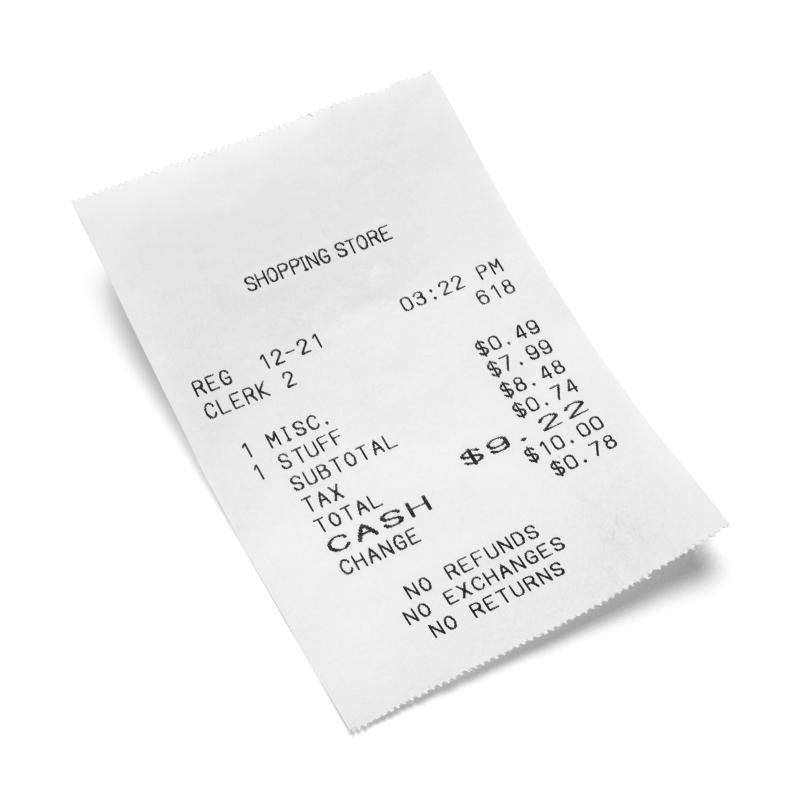
When Textract reads this receipt it will return the content it found in two forms:
- Summary Fields - words like “Shopping Store”, “No Exchanges” and “TOTAL” that stand alone. Textract will attempt to identify the meaning of that text e.g. names, addresses, VAT numbers etc.
- Line Item Groups & Line Items - these are rows of texts within tables and typically the details of the receipt. A line item group is basically a table and a line item a row within that table. Whilst a simple receipt will only have one table of line items it’s possible a hotel or car hire bill may have multiple tables so Textract plays safe and gives us an array of tables. In the example above there is a single Line Item Group with Two Line Items
- Misc $0.49
- Stuff $7.99
I’ll be sending this data to an LLM. I don’t want to send anything that may be sensitive such as a personal address so some of the Summary Fields such as “Name” or “Address” will be ignored when prompting the LLM.
Solution Space #
Now I’m thinking about the solution its important to base that on real data not just simplified data so I ran this slightly crumpled receipt through aws textract which produced a large JSON document with over 8000 lines.
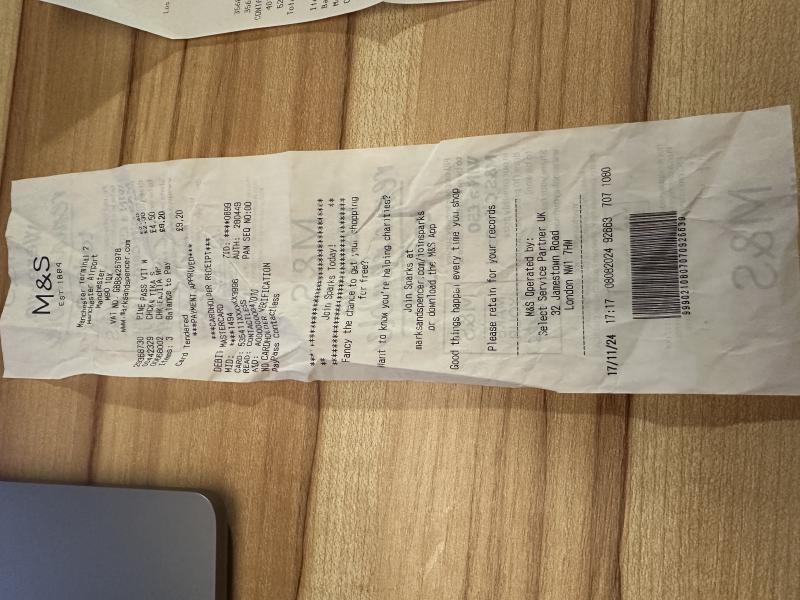
Take just the first line item in the receipt that reads “29368730 - PINE PASS VIT W - £2.30” that has over 150 lines of highly structured JSON.
 {
      "line_item_expense_fields": [
        {
          "page_number": 1,
          "type": {
            "confidence": 92.91315460205078,
            "text": "PRODUCT_CODE"
          },
          "value_detection": {
            "confidence": 92.88059997558594,
            "geometry": {
              "bounding_box": {
                "height": 0.015923436731100082,
                "left": 0.3871033191680908,
                "top": 0.16613367199897766,
                "width": 0.05253003537654877
              },
              "polygon": [
                {
                  "x": 0.38710713386535645,
                  "y": 0.16613367199897766
                },
                {
                  "x": 0.4392944872379303,
                  "y": 0.16638801991939545
                },
                {
                  "x": 0.4396333396434784,
                  "y": 0.18205711245536804
                },
                {
                  "x": 0.3871033191680908,
                  "y": 0.1818249672651291
                }
              ]
            },
            "text": "29368730"
          }
        },
        {
          "page_number": 1,
          "type": {
            "confidence": 99.96350860595703,
            "text": "ITEM"
          },
          "value_detection": {
            "confidence": 99.95870971679688,
            "geometry": {
              "bounding_box": {
                "height": 0.01568121463060379,
                "left": 0.46603885293006897,
                "top": 0.16891515254974365,
                "width": 0.1018521711230278
              },
              "polygon": [
                {
                  "x": 0.46603885293006897,
                  "y": 0.16891515254974365
                },
                {
                  "x": 0.5667520761489868,
                  "y": 0.1693989783525467
                },
                {
                  "x": 0.5678910613059998,
                  "y": 0.18459635972976685
                },
                {
                  "x": 0.466538667678833,
                  "y": 0.18415427207946777
                }
              ]
            },
            "text": "PINE\nPASS VIT W"
          }
        },
        {
          "page_number": 1,
          "type": {
            "confidence": 99.99966430664062,
            "text": "PRICE"
          },
          "value_detection": {
            "confidence": 99.97443389892578,
            "geometry": {
              "bounding_box": {
                "height": 0.013689628802239895,
                "left": 0.6078405380249023,
                "top": 0.17143931984901428,
                "width": 0.039756517857313156
              },
              "polygon": [
                {
                  "x": 0.6078405380249023,
                  "y": 0.17143931984901428
                },
                {
                  "x": 0.6461372971534729,
                  "y": 0.17162123322486877
                },
                {
                  "x": 0.6475970149040222,
                  "y": 0.18512894213199615
                },
                {
                  "x": 0.6090853810310364,
                  "y": 0.18496116995811462
                }
              ]
            },
            "text": "$2.30"
          }
        },
        {
          "page_number": 1,
          "type": {
            "confidence": 99.99983215332031,
            "text": "EXPENSE_ROW"
          },
          "value_detection": {
            "confidence": 99.98657989501953,
            "geometry": {
              "bounding_box": {
                "height": 0.019723456352949142,
                "left": 0.3871026039123535,
                "top": 0.16613367199897766,
                "width": 0.260573148727417
              },
              "polygon": [
                {
                  "x": 0.38710713386535645,
                  "y": 0.16613367199897766
                },
                {
                  "x": 0.6456804275512695,
                  "y": 0.16739386320114136
                },
                {
                  "x": 0.6476757526397705,
                  "y": 0.1858571320772171
                },
                {
                  "x": 0.3871026039123535,
                  "y": 0.1847274750471115
                }
              ]
            },
            "text": "29368730 PINE PASS VIT W $2.30"
          }
        }
      ]
    }
Extracting the price of each line item in ruby would look something like:
line_item_groups.collect do |line_item_group|
  line_item_group['line_items'].collect do |line_item|
    line_item_expense_fields.find do |line_item_expense_field|
      line_item_expense_field['type']['text'] == 'PRICE'
    end
  end
end.flatten.compact
As a ruby developer I find that a little ugly. It could be made simpler with some syntactical sugar like .dig but not much.
Wrapping a Textract Expense Document #
I’ll write a wrapper around all that json data for two reasons:
- As we’ve seen, extracting data from large json objects can get pretty ugly. I’d like all that ugliness inside one class not scattered across my application’s code.
- Things change fast. I may not always want to use Textract for reading receipts but receipts seldom change. If a better tool for reading receipts comes along it would helpful to have all the Textract specific logic in one place clearly exposing only the receipt functionality I need from that encapsulated data.
What do I want my wrapper to do ? #
To sum up. I want my Wrapper to:
- return an array of summary fields
- return an array of Line Item Groups each with a collection of line items.
- tell me if a field is sensitive field soit can be ignored when sending text to an LLM.
As you can see from the sample JSON above a large amount of data is geometry data which I simply don’t need so the first thing I will do when receiving Textract output is to remove it before storing it.
- remove all the geometry data
Before I create my wrapper I’ll create a utility class to encapsulate any summary field or line item values the wrapper returns:
Expense Value #
“Marks & Spenser” isn’t just a word, that word has a context - it’s the name of the vendor. Moreover, in giving us this word/context Textract also gives us a number between 0 .0 to1.0 which tells us how confident Textract is that it’s right.
So, I will create a utility class ExpenseValue that has value, context and confidence attributes. I’m guessing as the code evolves we can add other utilities to tell us things that may be useful such as ‘is it a number’, ‘does it contain a currency symbol’.
Remember that I don’t want to send sensitive data to an LLM ? I can also use this class to tell me if the value may be sensitive from its context e.g. ‘Name’
- value e.g. Marks & Spenser
- confidence e.g. 0.94
- context - e.g. Vendor Name
- senstive? - true/false from context.
Expense Document #
My expense document wrapper will extract data from the json document and pass it to me as Expense Value objects:
- #fields which will return an array of populated ExpenseValue objects that are summary fields.
- #tables which return an array of line_item_groups, each array will have its own array of ExpenseValue objects that represent the line item of type Expense_Row. Textract kindly breaks rows down into smaller parts like PRICE, TEXT and PRODUCT_CODE but I only need the whole row.
- #remove_geometry!
If you’re wondering why I have renamed summary_fields to #fields and line_item_groups to #tables it’s because I think they express the intent better. I also don’t want to get too locked-in to AWS Textract terminology in case I should choose to move away from it.
Up Next #
In the next article I create the Textract Wrapper - Expense Value class using TDD